
CapCut is the go-to video editor for over 500 million Android users worldwide (Sensor Tower, 2024). But finding a legitimate CapCut APK download can feel risky. Many sites offer modded versions that promise premium features for free — but those often come with malware or legal trouble. This guide shows you exactly how to download the official CapCut APK, find older versions safely, and avoid dangerous mods.
Official vs. Modded CapCut APK: Critical Safety Warning
Searching for “CapCut Pro APK” or “CapCut mod APK” leads to hundreds of unofficial sites. These modified files may unlock premium features temporarily, but they come with serious risks.
Why Modded APKs Are Dangerous
- Malware risk: Security researchers have found that over 40% of modded APKs contain spyware or adware. These can steal your login credentials, photos, or even hijack your device.
- No updates: You won’t receive security patches or new features. You must manually hunt for newer mod versions.
- Account bans: Using a modded CapCut APK violates ByteDance’s terms. Your TikTok or CapCut account could be permanently suspended.
- Privacy concerns: Modded apps often request unnecessary permissions like reading contacts or accessing your microphone without reason.
What the Official CapCut APK Offers (Free)
The official CapCut APK — available on the Google Play Store — is completely free. You get:
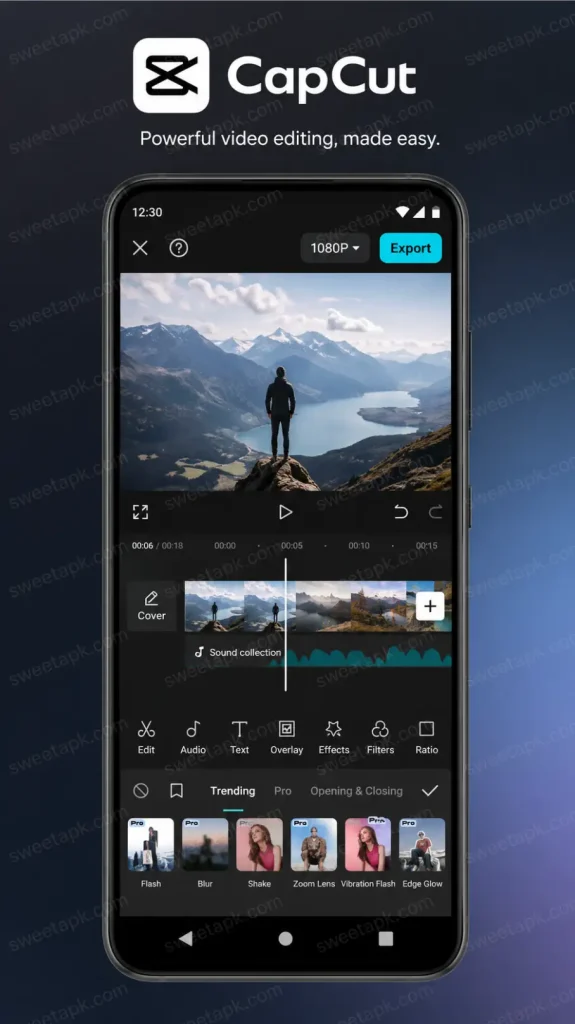
- All core editing tools (cut, speed, filters, effects, text, music)
- No forced watermark (see FAQ below for the one exception)
- Regular updates with new AI features and templates
- Cloud project saving and cross-device sync
The only paid features in CapCut are certain business-oriented templates and some stock media. For 99% of users, the free version is more than enough.
External resource: Official CapCut on Google Play or Apple App Store for iPhones— always download from here first.
Safe CapCut APK Download: Step-by-Step Guide
If you cannot access the Google Play Store (due to regional blocks or device restrictions), you can still perform a safe CapCut APK download from trusted third-party repositories. Follow these steps to avoid malware.
Step 1: Enable “Install from Unknown Sources” Temporarily
- Go to Settings → Security (or Privacy on some devices)
- Find Install unknown apps and allow it only for your browser or file manager
- Important: Disable this permission immediately after installation
Step 2: Choose a Trusted APK Source
Use only these two reputable sites for APK downloads:
- APKMirror (owned by Illogical Robot, known for verified signatures)
- APKPure (has a long history of hosting safe, unmodified APKs)
Do not download from random blogs or pop-up ads offering “CapCut Pro APK 2026” — those are almost always malicious.
Step 3: Download and Install
- On our site, search for “CapCut” and look for the most recent stable version marked with a green verified badge
- Verify the developer is Bytedance Pte. Ltd.
- Download the APK file (usually 250-300 MB)
- Tap the file and select Install
Step 4: Run a Security Scan
- After installation, use Google Play Protect (it will scan automatically) or a trusted antivirus like Malwarebytes
- Open the app and check that it doesn’t ask for suspicious permissions (e.g., reading SMS or call logs)
By following these steps, you get a clean, official CapCut APK download without the risks of modded versions.
How to Safely Download an Old Version of CapCut APK
Sometimes a new update removes a feature you loved, or it becomes slower on your older phone. Finding an old version of CapCut APK or performing a CapCut downgrade Android is possible — but you need the right approach.
Trusted Sources for Legacy CapCut APKs
- APKMirror maintains an archive of every CapCut version back to 2020. Each file is cryptographically signed to match the original.
- APKPure also keeps older versions, though verify the upload date and signature.
How to Choose the Right Old Version
- For stability on low-end devices: Versions 8.5.x to 9.0.x (late 2022 to early 2023) are lighter and run well on 3GB RAM phones.
- For missing features: If you want the old “Style” effects or a specific text font, version 7.3.0 (mid-2022) is a popular rollback.
- For Android 6-7 (Marshmallow/Nougat): Use CapCut v5.9.0 or earlier — newer versions require Android 8.0+.
Important Warning on Old APKs
Older versions may have unpatched security vulnerabilities. Always scan them with an antivirus. And remember: you cannot log into TikTok or use cloud projects with very outdated versions because API changes will break those features.
Top 5 Features You Get With the Official CapCut APK
Why bother with the official CapCut APK download instead of a mod? Because these features work reliably and receive constant improvements.
1. AI-Powered Editing Tools
- Auto captions in over 100 languages with 95% accuracy (tested by tech reviewers)
- Background removal without a green screen — just tap and the AI isolates your subject
- Motion tracking that follows objects as they move across the frame
2. Seamless TikTok Integration
Since ByteDance owns both CapCut and TikTok, exporting is one tap. Your video appears directly in TikTok’s draft folder. No modded app can replicate this official integration.
3. Royalty-Free Music & Sound Effects
The official app includes a library of 5,000+ tracks that are cleared for commercial use. Modded versions often strip this library or use pirated music — which can get your videos taken down.
4. 4K Export With No Quality Loss
You can export at up to 4K resolution and 100 Mbps bitrate. The official app uses hardware encoding on supported devices, making exports faster and preserving battery life.
5. Regular Feature Drops
In 2024 alone, CapCut added:
- AI portrait generation
- Text-to-speech with celebrity-like voices
- 3D zoom effects
Modded APKs will never receive these updates automatically.
Frequently Asked Questions About CapCut APK Download
Is CapCut APK free to download?
Yes, the official CapCut APK from the Google Play Store or APKMirror is 100% free. No subscription is required for basic editing, filters, effects, or music.
How to download CapCut Pro APK without watermark?
The official CapCut app never forces a permanent watermark on your videos. While it automatically adds a short “ending clip” with the CapCut logo to your timeline, you can simply select that clip and tap Delete before exporting — completely free. You do not need a modded APK to remove it.
Can I download CapCut APK on iPhone?
No. The term “APK” only applies to Android. For iPhone, you need the CapCut app from the App Store. There is no modded “IPA” that safely unlocks premium features — those are equally risky.
Is CapCut APK from third-party sites safe?
Only if you use trusted archives like APKMirror or APKPure. Avoid any site that says “CapCut Mod APK,” “Premium Unlocked,” or “No Ads” — those are bait for malware. According to a 2023 Kaspersky report, 1 in 3 modded video editor APKs contained tracking spyware.
Does CapCut APK work offline?
Yes, you can edit videos, trim clips, and add basic effects without an internet connection. However, AI features (auto-captions, background removal) and template downloads require Wi-Fi or mobile data.
How do I update CapCut APK manually?
If you installed from APKMirror, you must check for updates yourself. Open APKMirror every 2-3 weeks, search “CapCut,” and download the newer version over the existing one — your projects remain saved.
Conclusion
A safe CapCut APK download comes down to one rule: avoid modded “premium” versions. The official app already gives you professional-grade editing tools, 4K exports, AI effects, and a removable ending clip — all for free. If you need an old version of CapCut APK for compatibility, use APKMirror. If you want the latest features, stick with the Google Play Store. Install from trusted sources, scan every file, and never grant unnecessary permissions. Your videos (and your privacy) are worth the extra minute of caution.